For coaching institutes, colleges and hiring teams
Online exams on your brand. At any scale.
Build a proctored MCQ test, share one link, and publish ranks the same day. Students sit on your domain. We run the servers.
New: Old paper to live test in 2 minutes.
Built for coaching institutes, colleges, hiring teams.
- Start free
- Pro ₹99 first month
- Students never pay
- Invoice on every payment
- Auto scales as students join
- 6 lakh requests in one exam hour
- 0 lost submits at 5,000 per second
- < 0.4s to save each answer
Production numbers, September 2026.
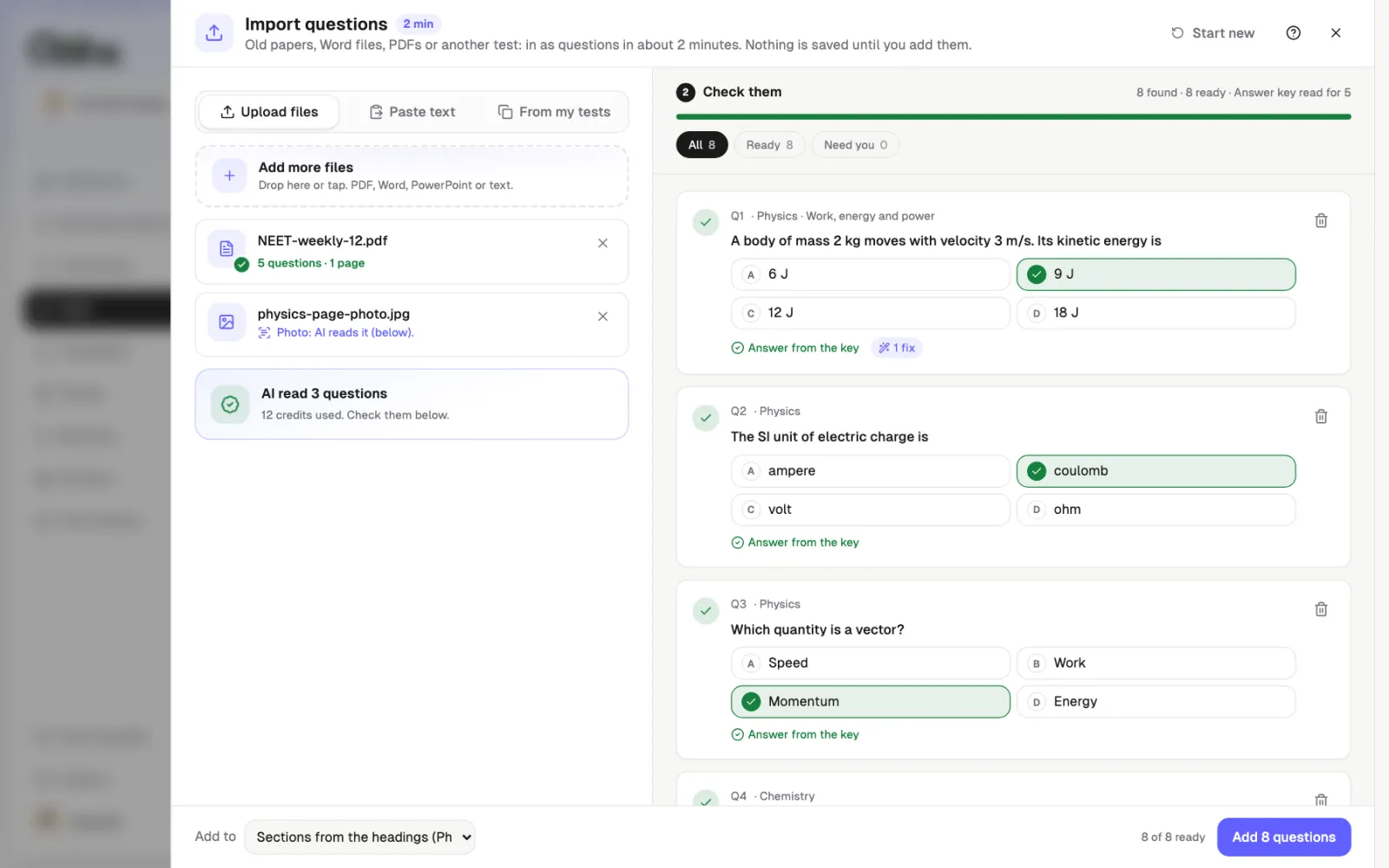
New · Import
Bring last year's paper. No template. No retyping.
Drop a PDF, Word file or photo, or paste text. Every question is read, checked by you, then added.
- Word
- PowerPoint
- Photos
- Pasted text
- Hindi
- Typed files read free
- AI reads scans and photos
- Nothing saved until you check
One exam platform. Three kinds of teams.
Coaching institutes
Weekly mock tests and test series for JEE, NEET, UPSC, SSC and banking.
- Ranks out the same evening
- Your brand on every screen
- Whole batch in one link
Colleges and universities
Internal assessments, semester MCQ exams and placement practice.
- Invited student emails only
- Fullscreen with tab-switch log
- Marks export for the register
Hiring and HR teams
Aptitude and skills tests before the interview round.
- Shortlist from a ranked list
- No candidate passwords
- Scored on the server, not the browser
From question paper to ranks in four steps.
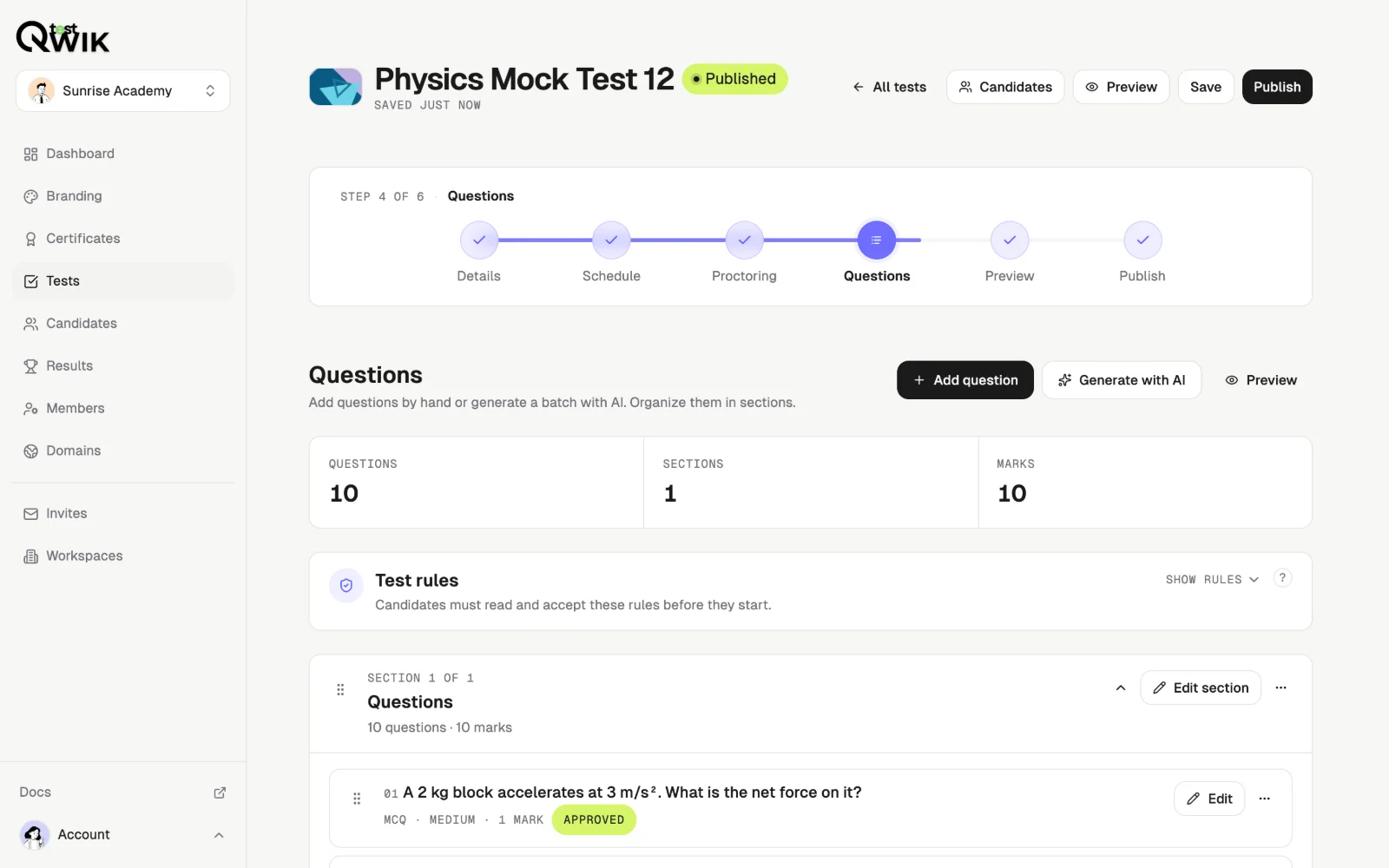
Build the paper
Write MCQs or let AI draft them. You approve every question.
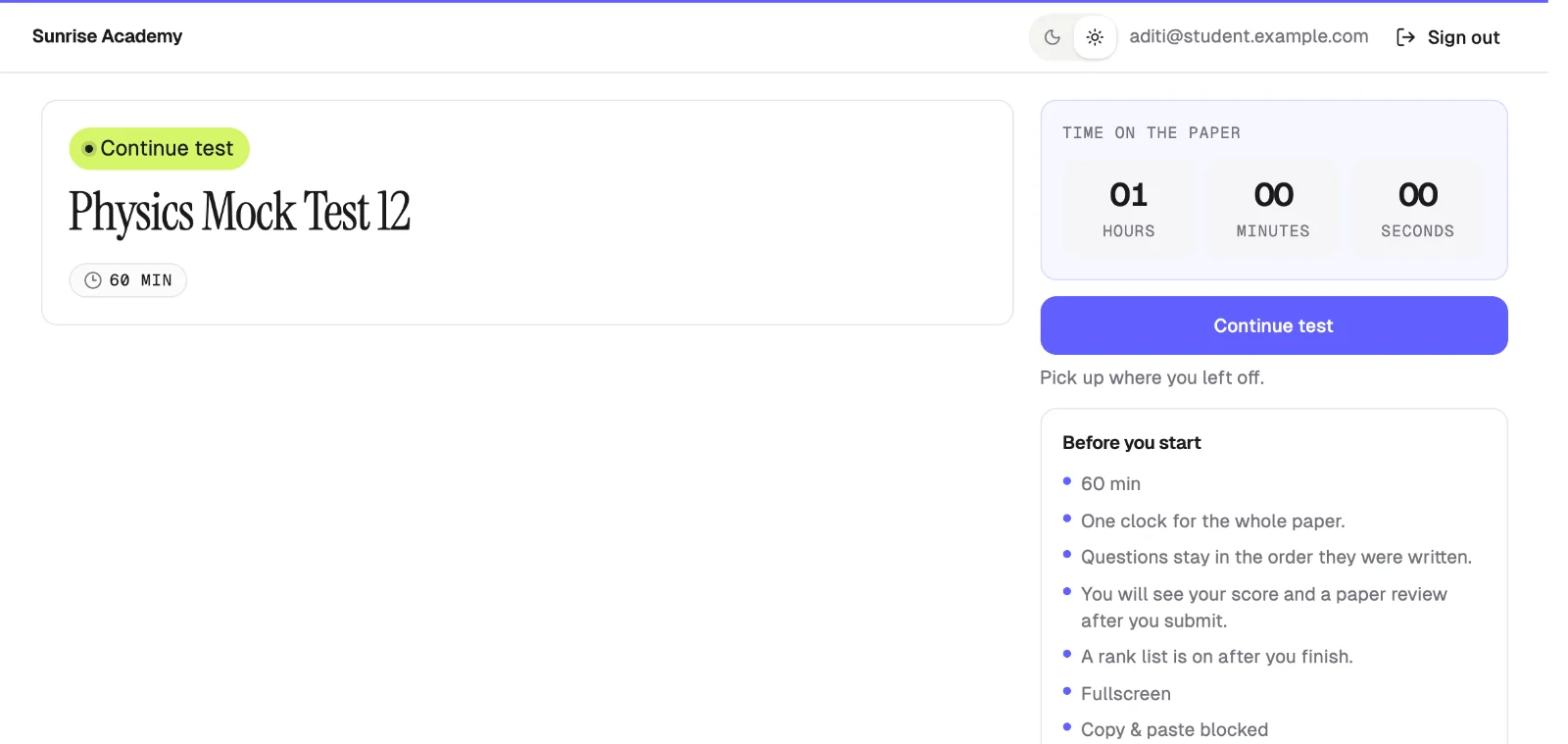
Add your brand
Your logo, colour, and domain. Students only see you.
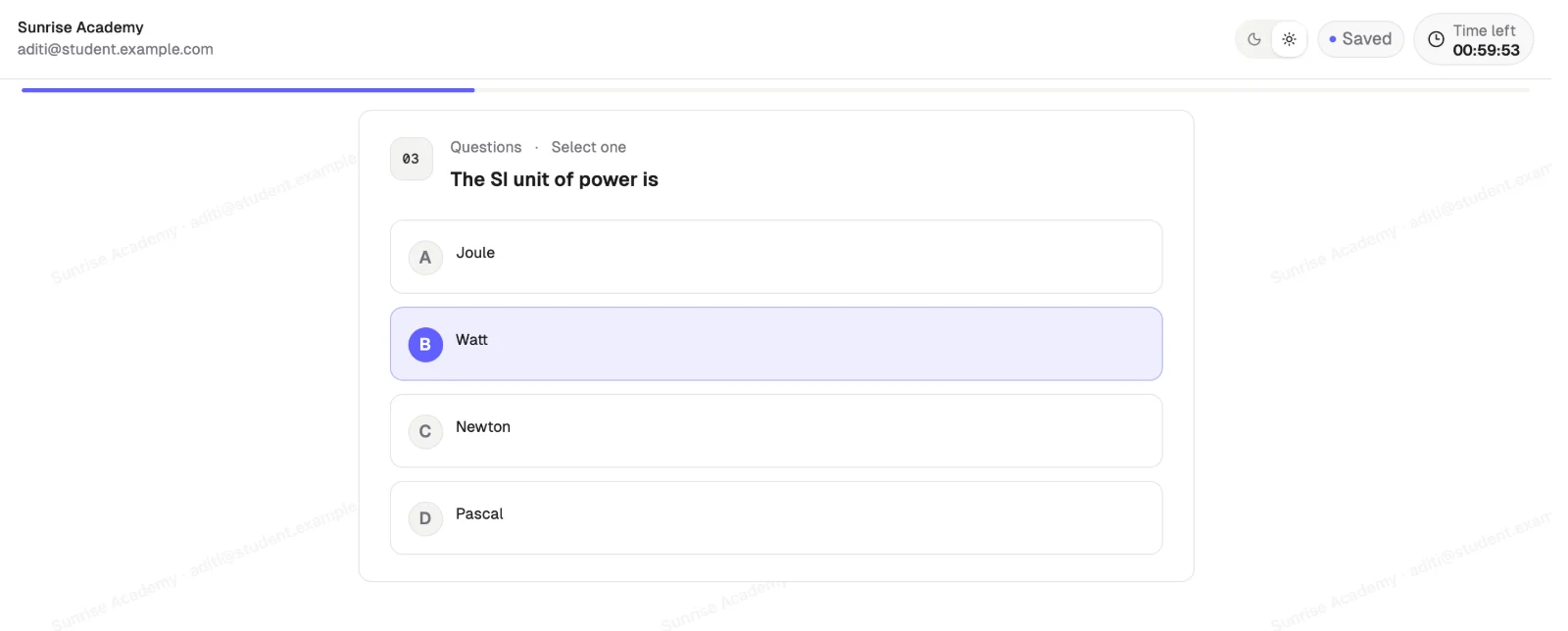
Students sit
Email code login, fullscreen, timer. Every answer saved.
Get ranks
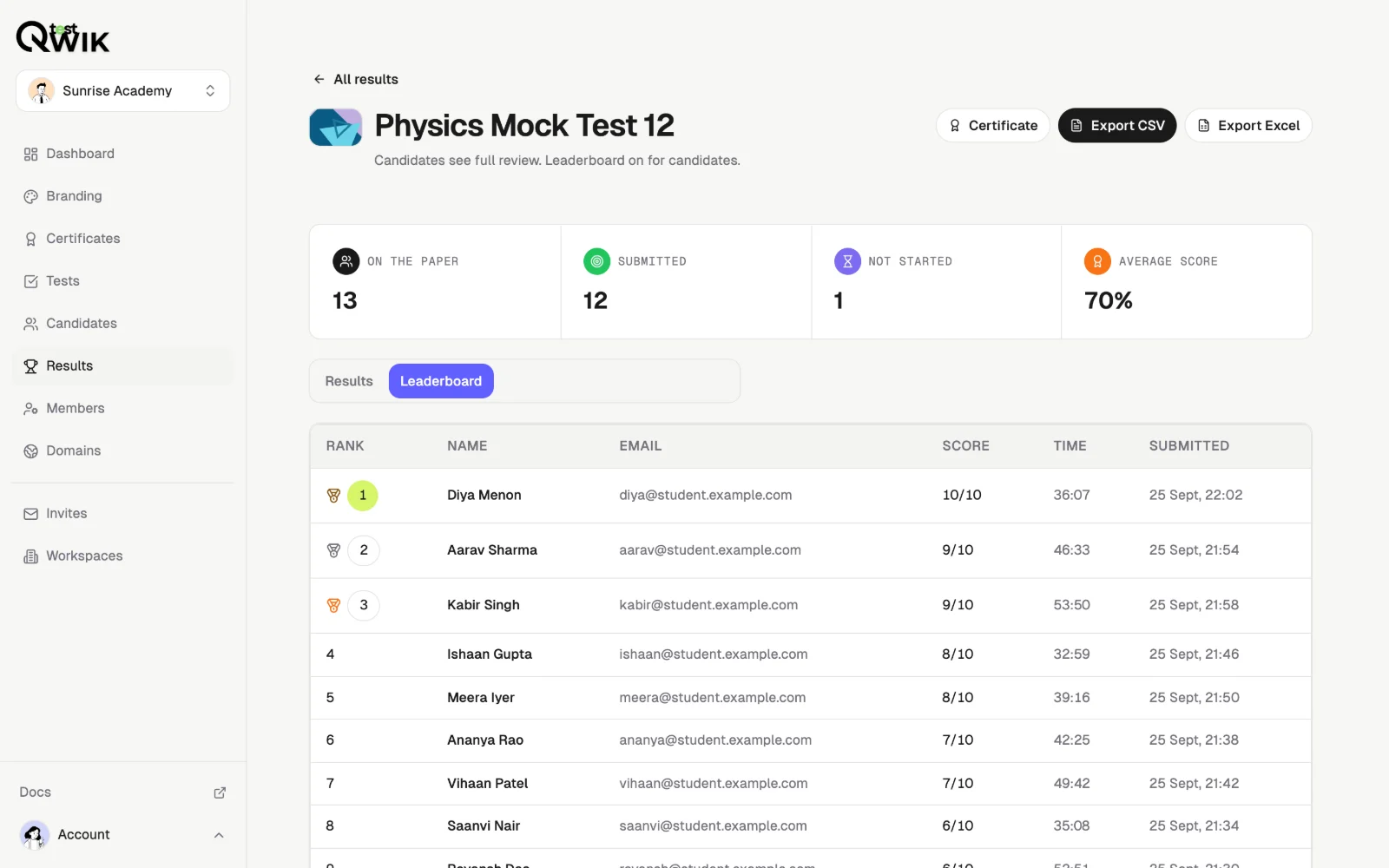
Scored on the server. Leaderboard, Excel export, certificates.
Everything an exam needs. Nothing to install.
AI question drafts
Draft a full paper from a topic. You approve every question before it goes live.
Auto-scaling servers
10 students or 10,000. No servers to book, size, or babysit on exam day.
Proctoring
Fullscreen, copy block, tab-switch log.
No passwords
Email code or Google sign-in.
Server scoring
The browser never sets the mark.
Any device
Phone, tablet, or laptop. No app to install.
Ranks and exports
Leaderboard, CSV, and Excel when the window closes.
Certificates
Sent to everyone who finishes, with a link anyone can verify.
Paste last year's paper. Get a live test in a minute.
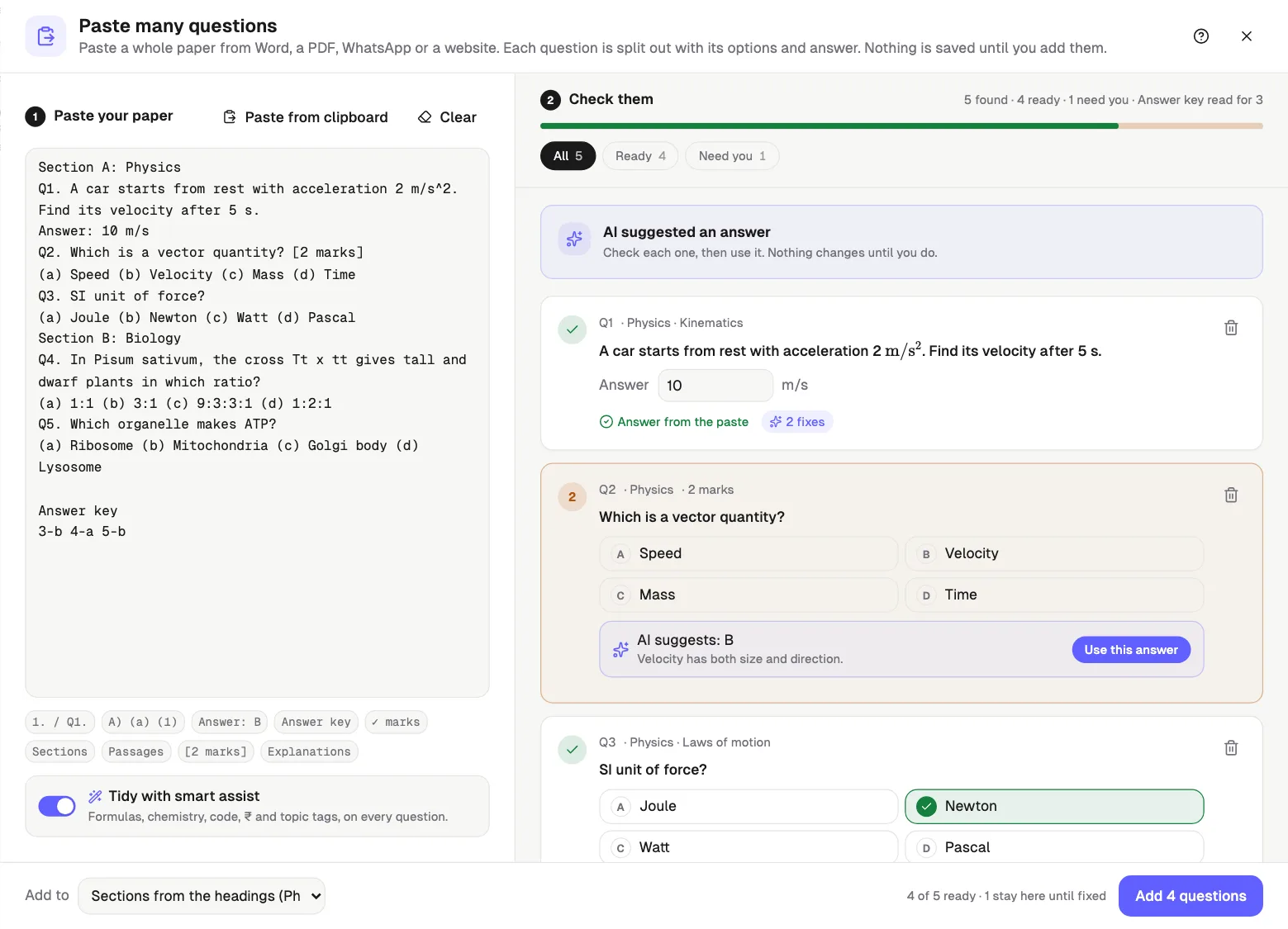
Drop a PDF, Word file or photo, or paste text from WhatsApp or a website. Qwiktest splits every question, reads the answer key, and tells you what is missing.
How Smart Assist reads a paper
Every question split out
1. or Q1. numbering, A) (a) (1) options, sections, passages and marks.
Answers read for you
“Answer: B” lines, ✓ marks, or a key like 1-B 2-C at the end.
Missing answers flagged
Tick it yourself, or ask AI to suggest one. You confirm every answer.
Tidied and sorted
Formulas, code and biology names fixed. Sections by heading or topic.
One builder for every subject.
JEE, NEET, UPSC, SSC, coding or hiring. Paste anything; Smart Assist cleans it in one tap.
Smart Assist · free and unlimited
Free. Unlimited. Instant.
- Unlimited fixes
- 0 AI credits
- Runs on your device
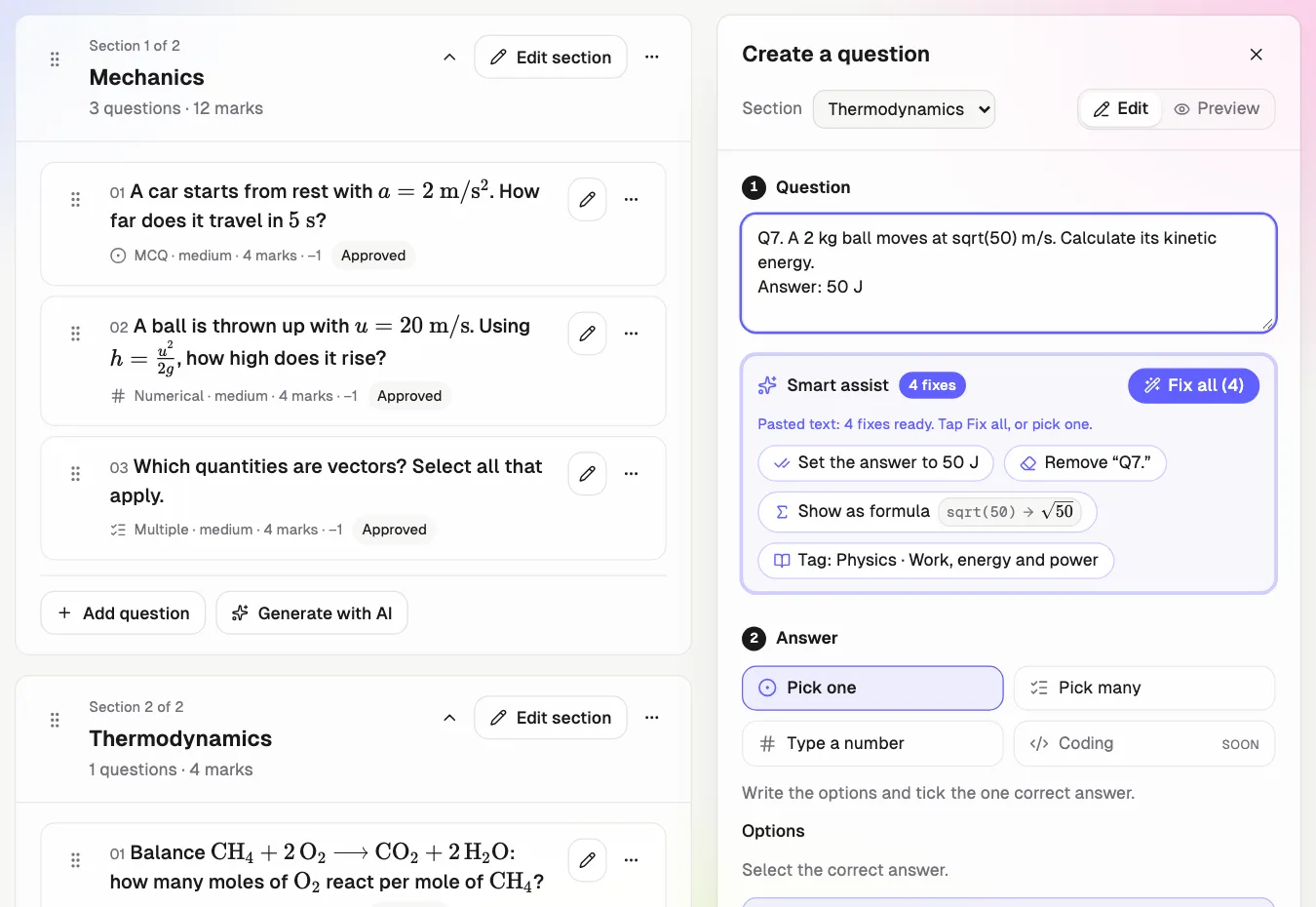
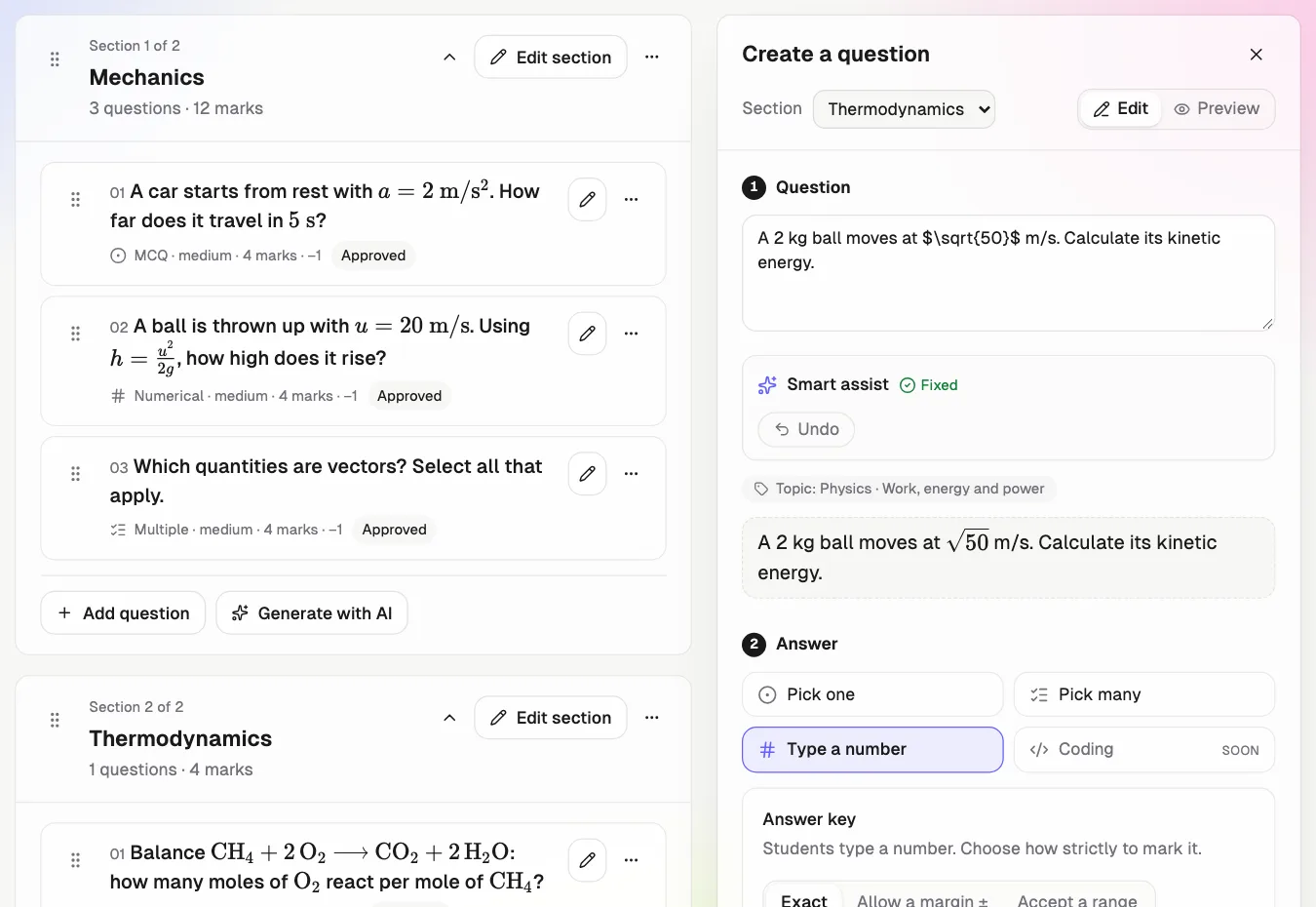
- Paste a messy question
- Tap Fix all, or pick one
- Preview it as students see it
Maths and physics
Typed maths becomes real formulas.
Chemistry
Subscripts and reaction arrows.
Biology, for NEET
Italic names. Match tables.
Numerical, like JEE
Exact, ± margin or a range.
Government exams
SSC, UPSC, banking, railways.
Coding and tech MCQs
Code keeps its spacing.
Aptitude, reasoning and GK
Series, percentages, English.
Single and multi-correct
Pasted options split themselves.
Hiring tests
Timed, proctored screening.
Coding and DSA tests
Run code against test cases.
Every question can be tagged by subject and topic in one tap, so papers stay sorted.
How students see it
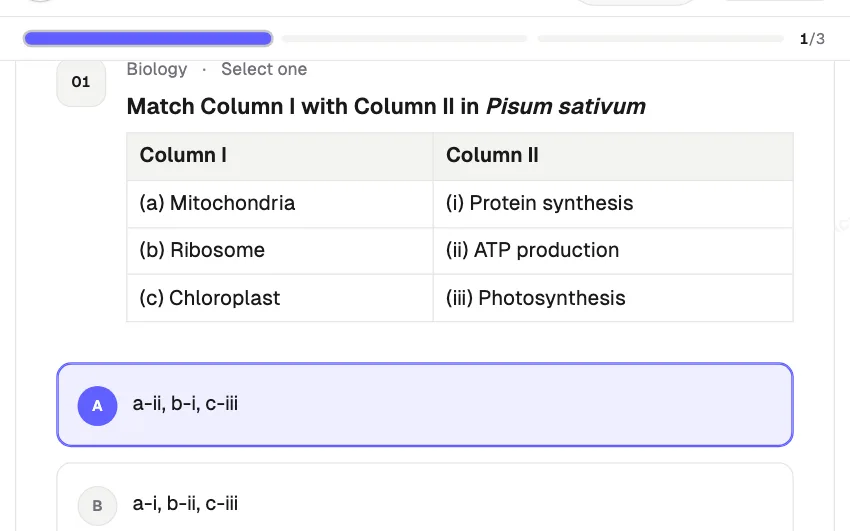
Biology: match the following
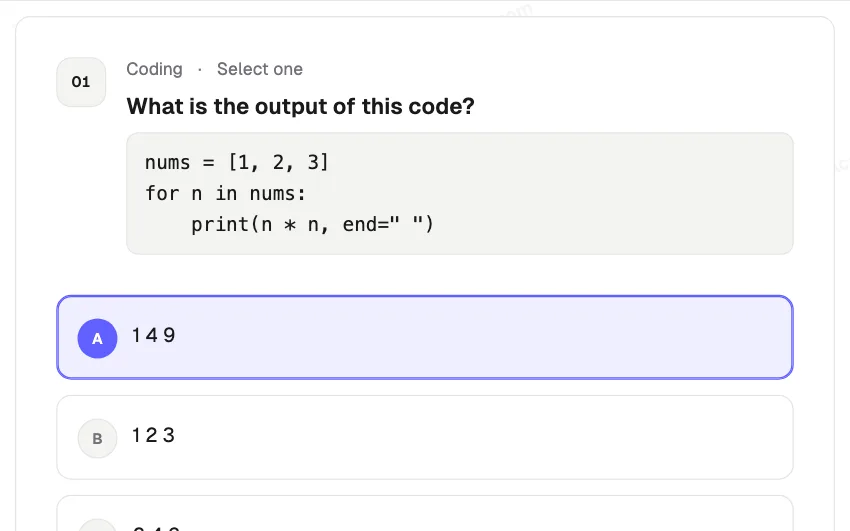
Coding: what is the output?
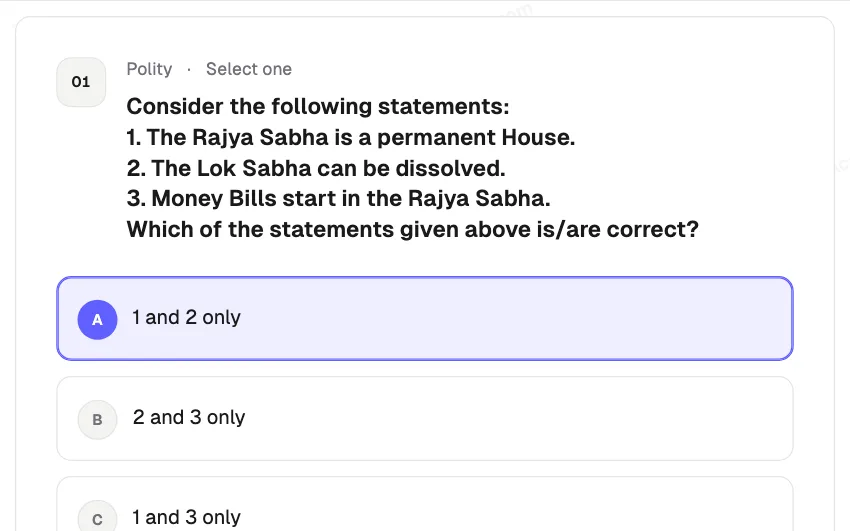
UPSC: numbered statements
Calm for students. Sealed for you.
Real screens from the exam your students sit.
Practice before the test
Three warm-ups in the real exam screen. Never marked.
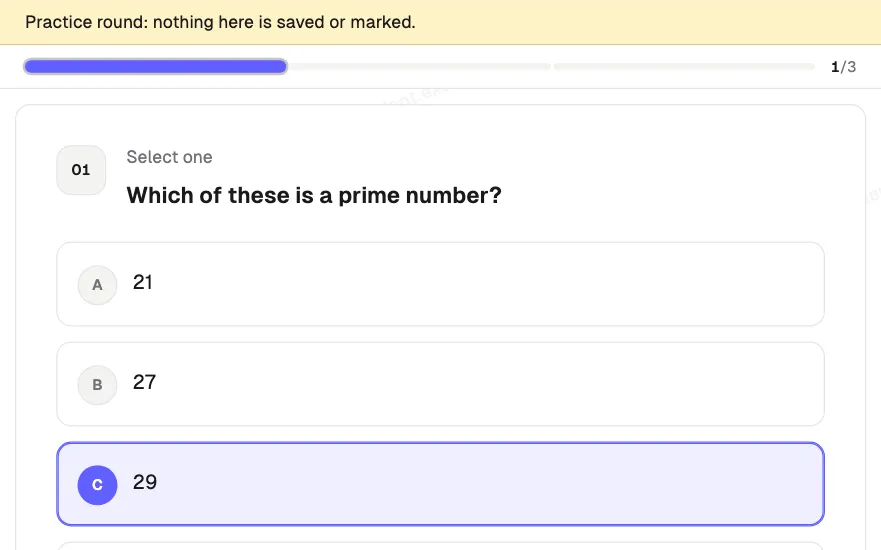
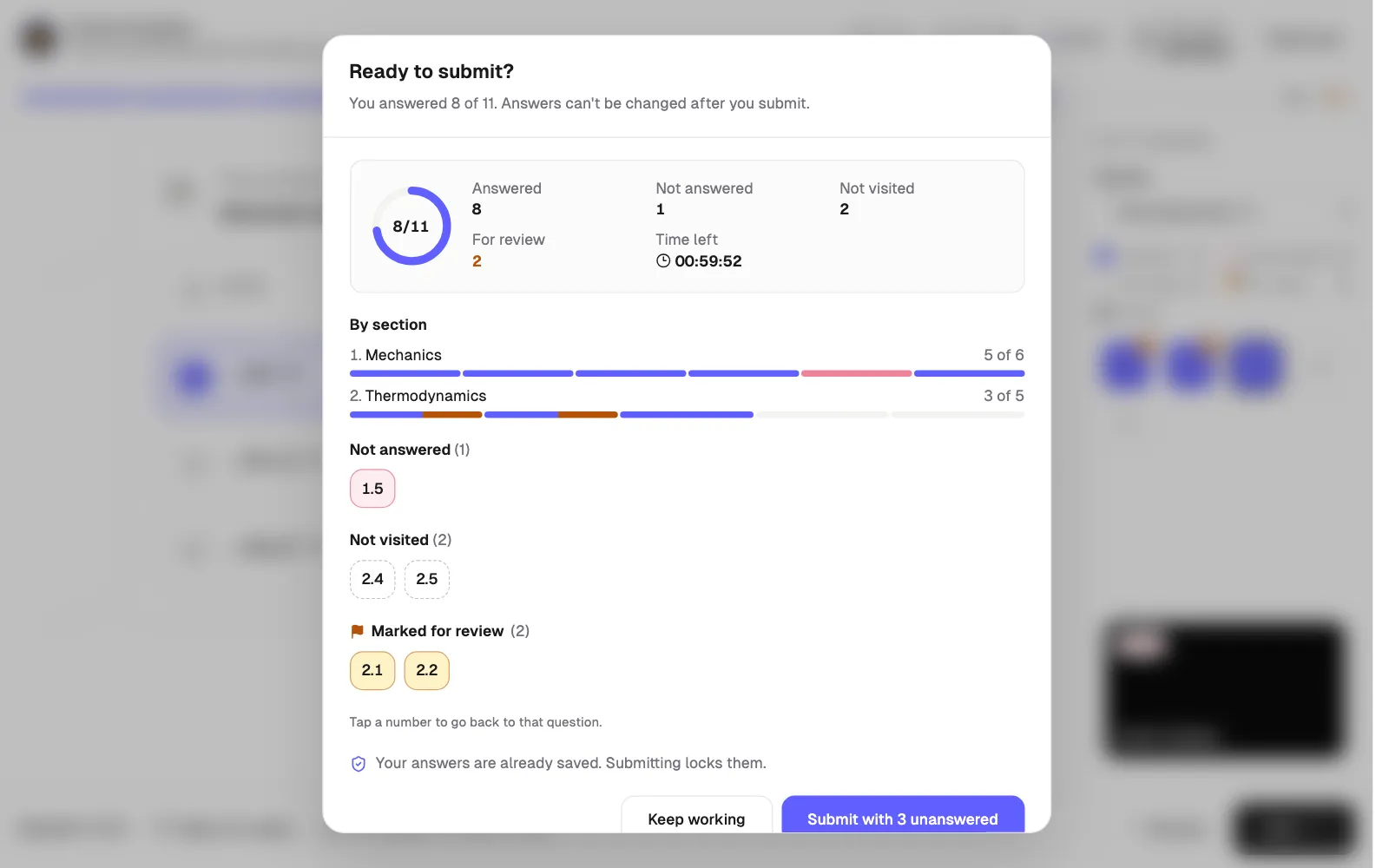
Review before submit
Not answered, not visited and marked, one tap away.
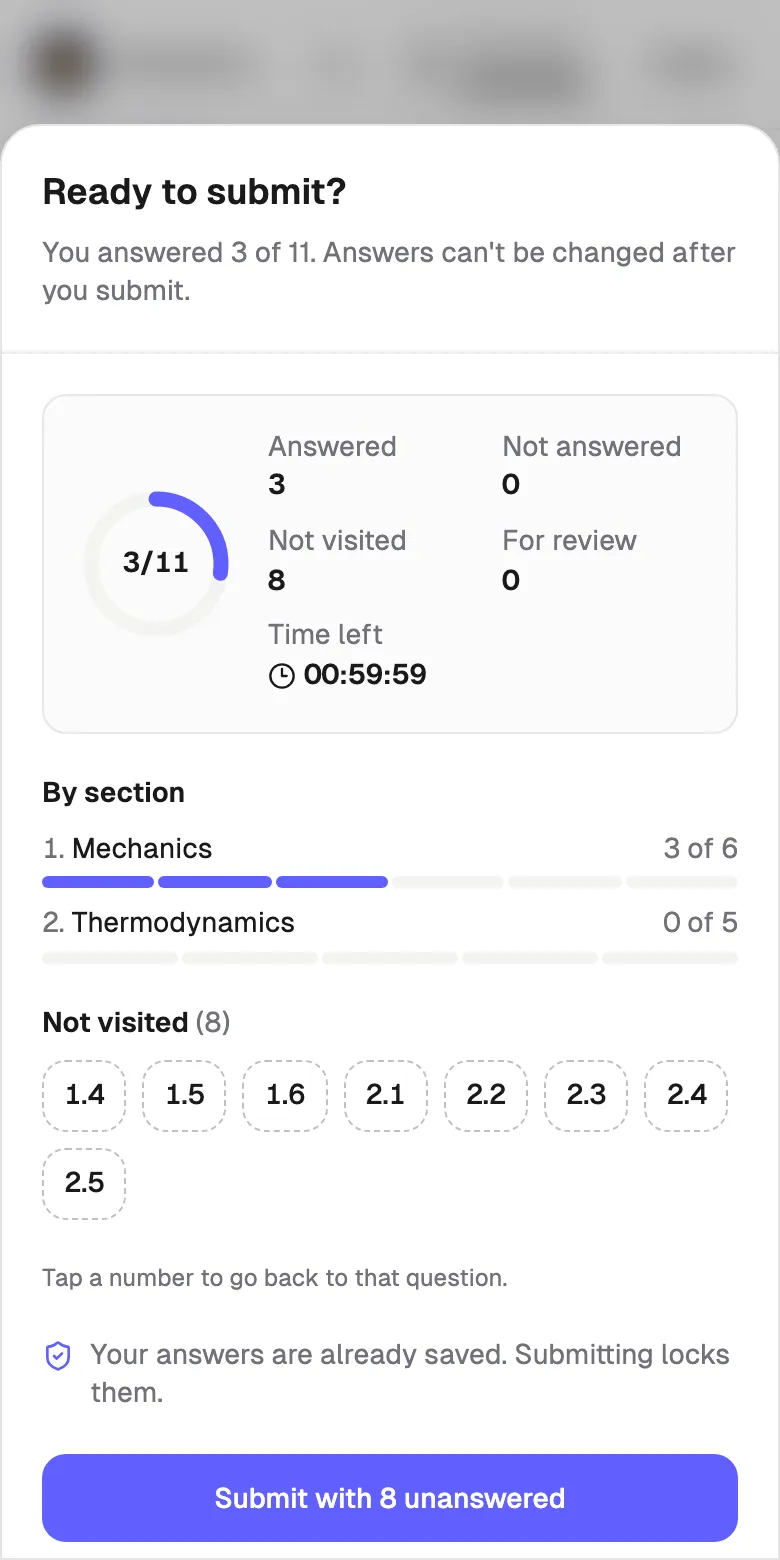
Made for phones
Big answer targets. No sideways scroll.
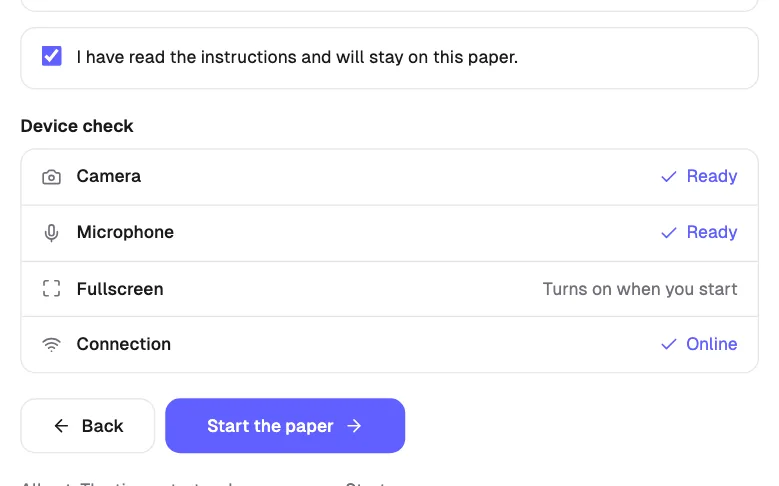
Device check first
Camera, mic and connection confirmed before the timer starts.
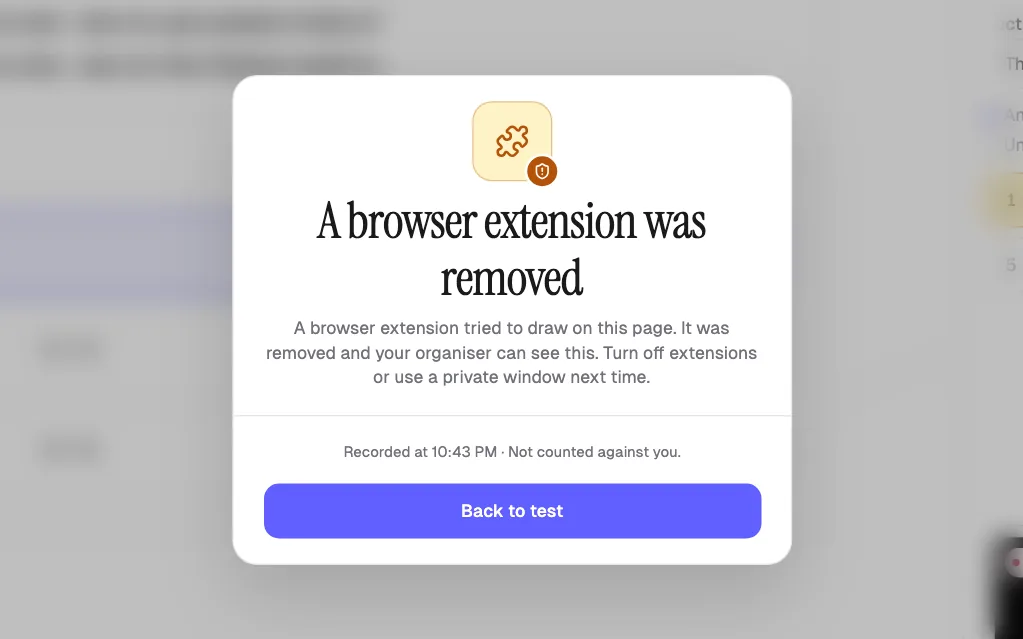
Extensions blocked by default
AI helpers and pop-ups are removed and logged.
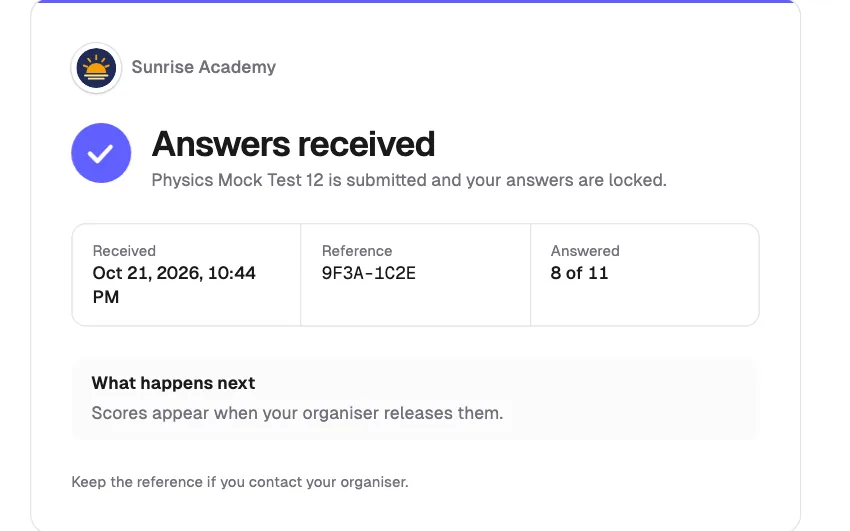
Proof of submission
Time received and a reference code on every paper.
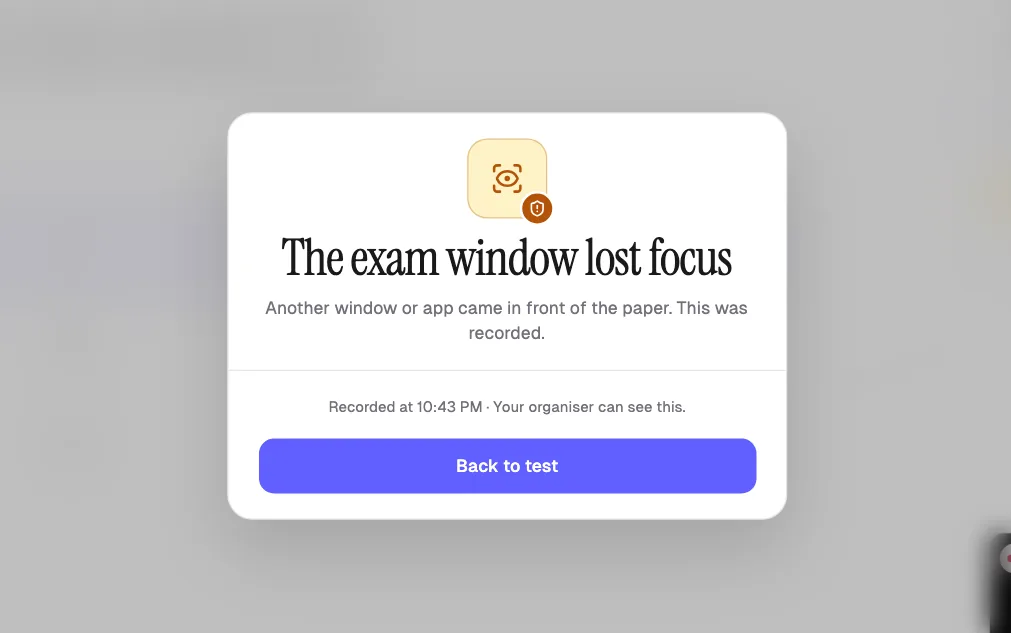
Privacy blur
The paper blurs the moment the window loses focus.
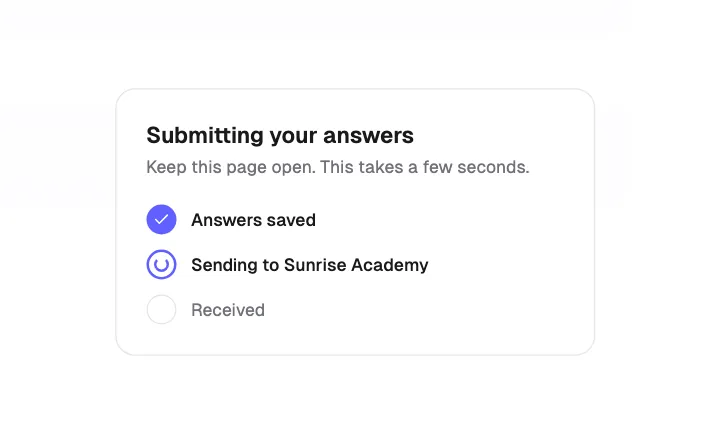
Instant submit
Feedback the moment they tap Submit, even at peak load.
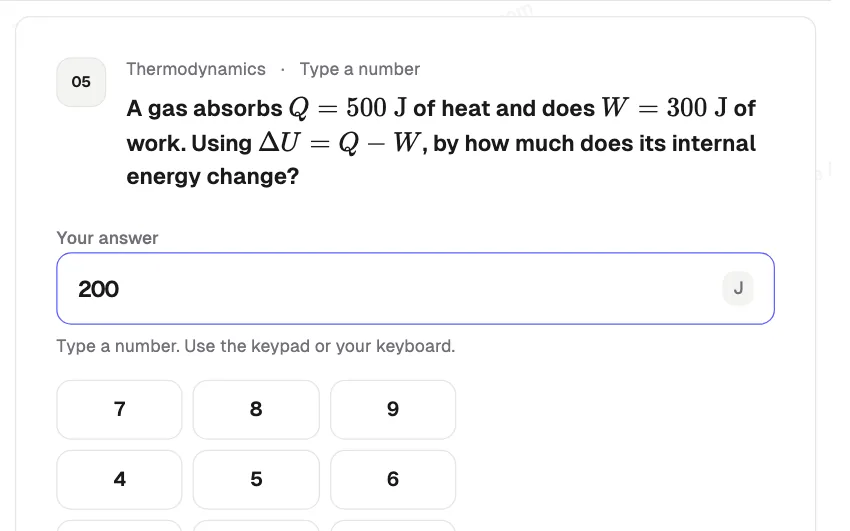
Numerical answers, like JEE
Students type the number on a keypad. You set exact, ± margin or range.
A report for every student. Analytics for every teacher.
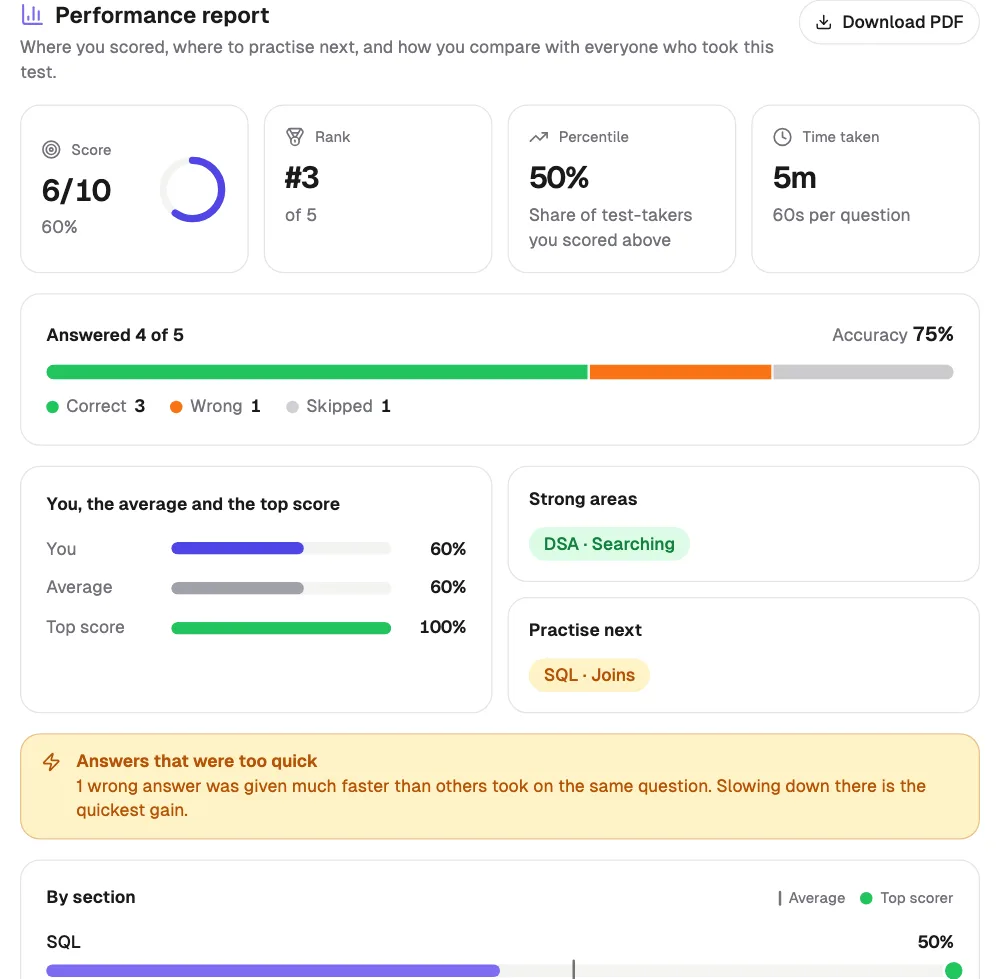
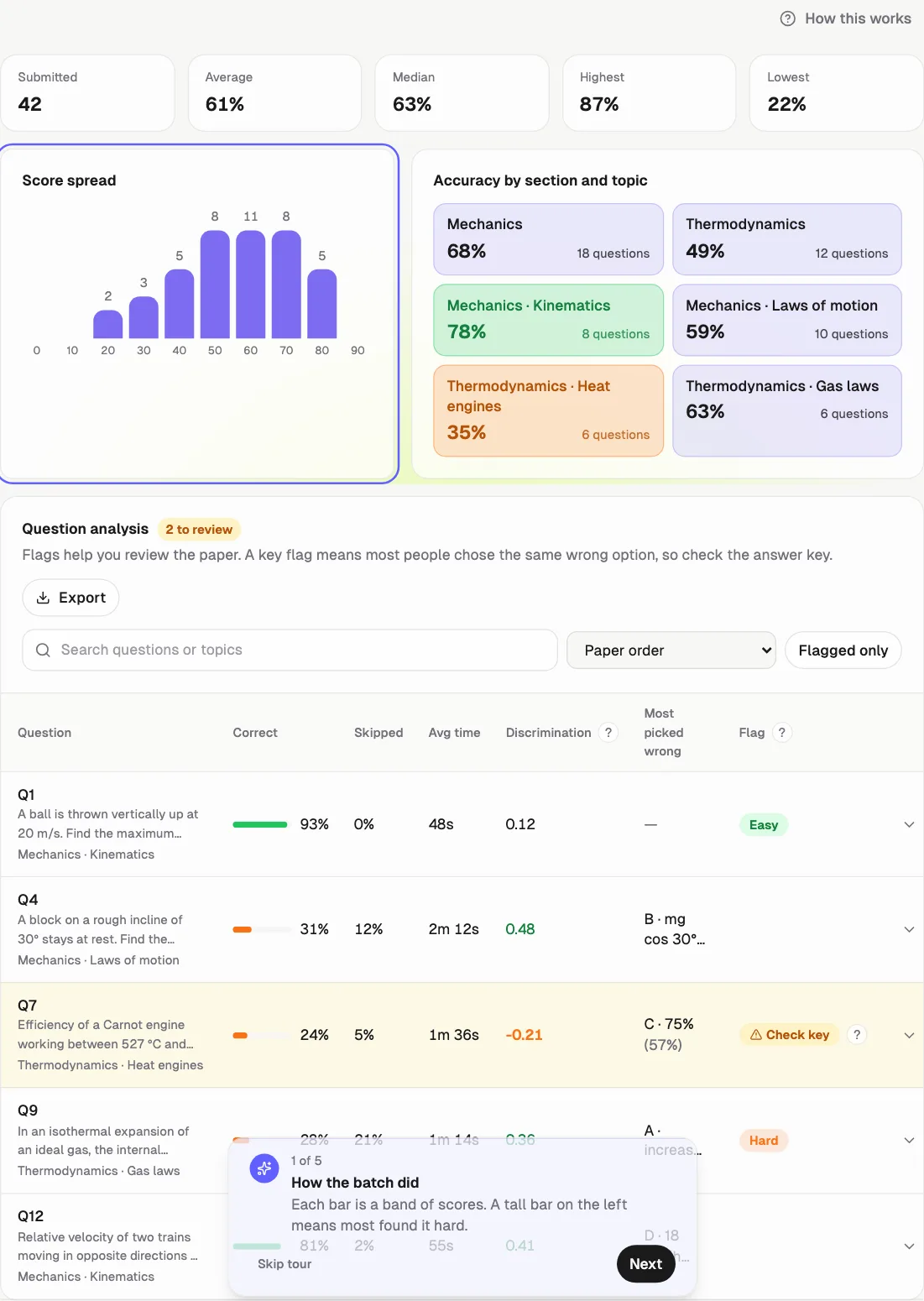
Section, topic, time and rank against the batch, ready when the test closes. JEE, NEET, UPSC, SQL, DSA or any subject. On every plan.
For students
- Score, rank, percentile and time
- Strong areas and what to practise next
- Compared with the average and the topper
- Download as PDF
For teachers
- Questions to re-check, flagged for you
- Score spread and topic heatmap
- Each student's report in one click
- On or off for each test
- Fix a wrong key after the test, with undo
- Discrimination and every option's share
Forms were not built for exams.
| Topic | Forms and spreadsheets | Qwiktest |
|---|---|---|
| Who can sit | Anyone with the link | Only invited emails, with a 6-digit code |
| Answer key | Lives inside the form | Stays on the server until results |
| Cheating | Open tabs, copy and paste | Fullscreen, copy block, tab-switch log |
| Timer | Honour system | Server timer with auto-submit |
| Results | Hours of sheet formulas | Ranks, Excel and certificates in a click |
| Branding | Someone else's logo | Your logo, colours and domain |
| AI helpers | Extensions read every question | Extension overlays removed and logged |
Built so the paper stays fair.
Every exam runs with the same protections. No add-on, no extra setting.
Invited emails only
A 6-digit code goes to each student's inbox. No code, no entry.
Sealed until start
Questions load only when the exam window opens.
Fullscreen lock
Copy, paste, and right-click are blocked during the test.
Tab-switch log
Every switch is timestamped for you to review.
Server-side marks
Answer keys never reach the browser.
Secure sessions
HttpOnly cookies and no stored passwords.
Extensions blocked
AI helper overlays are removed and logged. On by default.
Privacy blur
The paper blurs when the window loses focus.
White-label: Your domain. Your logo. Your exam.
- exam.yourinstitute.com with one CNAME record
- Free yourinstitute.qwiktest.in on day one
- Your logo and colours on every screen
- Login codes from your own mailbox
Start free. Pay monthly or yearly when you grow.
Start free. Pro ₹99 for your first month. No auto-debit. Students never pay.
| Plan | Price (INR) | Student sittings / 30 days | Live tests | AI credits / 30 days |
|---|---|---|---|---|
| Free | ₹0 forever | 20 | 1 | 0 |
| Starter | ₹499 a month, or ₹4,990 a year | 500 | 10 | 1,500 |
| Pro | ₹1,499 a month, or ₹14,990 a year | 3,000 | Unlimited | 5,000 |
| Business | ₹3,999 a month, or ₹39,990 a year | 10,000 | Unlimited | 10,000 |
Enterprise: Enterprise gets custom limits, unlimited team logins, and a price quoted for your volume. Talk to sales
Questions, answered
Last updated
Can students practise before the test starts?
Yes. The lobby has a practice round: three questions in the real exam screen, with the question map, Mark for review and the number keypad. Nothing is saved or marked, and it never uses a sitting. Teachers can keep Qwiktest's samples, write up to three of their own, or switch it off for a test.
Does the exam show which questions a student hasn't opened?
Yes. The question map shows five states, like the NTA exam screen: not visited, not answered, answered, marked for review, and answered and marked. Each has its own shape as well as colour, so it reads the same in a JEE mock, a coding test or a hiring round. The review sheet lists not-visited questions separately, one tap away.
Can students answer any 150 of 180 questions?
Yes, if you want. Each section can say "answer any 10 of 15", like NEET Section B. Students see a counter, can't answer more than the limit, and can clear one to pick another. Only those count, and the score is out of the counted questions. A section can also be practice, never marked. It's optional: normal papers are unchanged.
Can I fix a wrong answer key after the test?
Yes. Open the question in Results → Analytics and tap Fix answer: change the answer, accept two options, or drop the question for full marks to everyone. You see how many scores change first, then every paper is marked again on the server. Students can be emailed, and any change can be undone.
Does Qwiktest give students a performance report?
Yes. After a test, each student sees score, rank, percentile and time, accuracy by section and topic against the batch average and the topper, strong areas, what to practise next, and a PDF. Teachers get class analytics: score spread, topic heatmap and questions flagged for a key check. You can turn it off for any test.
What is Qwiktest?
Qwiktest is white-label online exam software from Bengaluru, India, for coaching institutes, colleges, and hiring teams. You create a timed MCQ test, students sit on your own branded link, and the server scores every paper and publishes ranks the same day.
How do I conduct an online exam?
Open a free workspace, add MCQs or let AI draft them, set the timer, and add student emails. Students open your exam link, enter a 6-digit code from their email, and sit. The server marks every paper and ranks appear when the window closes.
How many students can take the exam at once?
There is no fixed seat count. Qwiktest runs on auto-scaling cloud infrastructure that grows as students join. On production it has handled about 6 lakh requests in one exam hour and 5,000 submits in the same second with no answer lost.
Do students need to install an app?
No. Students sit in any modern browser on a phone, tablet, or laptop. The exam screen fits the device, saves every answer as they go, and auto-submits when the timer ends.
Can I use my own domain and logo?
Yes. Qwiktest is white-label. Every workspace gets a free yourinstitute.qwiktest.in address with your logo and colours. From Starter up, students can sit on your own domain, like exam.yourinstitute.com, set up with one CNAME record.
Can students cheat?
Qwiktest makes it hard. Only invited emails can log in, the paper stays closed until start, and the test runs fullscreen with copy, paste, and right-click blocked. Tab switches are logged, and marks are calculated on the server.
Does AI write or grade the exam?
AI only drafts questions with answer keys, and every draft needs your approval before it goes live. AI never grades students. On paid plans you can bring your own OpenAI key so drafts cost no credits.
How much does Qwiktest cost?
Every account starts on Free, and new workspaces can take Pro for ₹99 for the first month. Paid plans are Starter ₹499, Pro ₹1,499 and Business ₹3,999 a month, or 10 months' price for a year. You pay once per period, nothing auto-debits, and students never pay.
Is there a plan for very large exams?
Yes. Enterprise is for universities and large hiring drives, with custom sittings, unlimited team logins, and a price quoted for your volume. Write to support@qwiktest.in or use Talk to sales.
Can I export results?
Yes. Every test has a leaderboard with score and time taken, and you can download marks as CSV or Excel. Students who pass can receive a certificate by email.
Can students use ChatGPT or AI browser extensions during the exam?
Qwiktest blocks extension overlays by default. When an AI helper or other extension draws on the exam page, Qwiktest removes it, warns the student, and logs it for you. The paper also blurs when the window loses focus, so screen-capture and overlay tools see nothing. You can turn extension blocking off for a test that needs an assistive extension.
Does Qwiktest support maths, physics and chemistry formulas?
Yes. Questions and options show formulas such as fractions, roots, powers, integrals, vectors and chemical equations, written in standard LaTeX. Paste them the way ChatGPT or Word gives them, with $…$ or \(…\), and the editor shows a live preview. AI drafts write formulas the same way. Papers without formulas load nothing extra.
Can I add numerical answer questions, like JEE?
Yes. Choose Numerical answer and set the correct value as exact, within a ± margin, or as a range, with optional decimal places and unit. Students type the number in an answer box with an on-screen keypad. The server marks it, so the answer never reaches the browser, and negative marking follows your test setting.
What is Qwiktest Smart Assist?
Smart Assist is a free, unlimited helper in the Qwiktest question builder. Paste or type questions and it offers one-tap fixes: maths and chemistry formatting, answer keys, options, code blocks, ₹ amounts and topic tags. It runs on simple rules in your browser, so it uses no AI credits. Details: qwiktest.in/smart-assist.
Can I paste a whole question paper into Qwiktest?
Yes. Copy up to 200 questions from Word, a PDF, WhatsApp or a website and paste them at once. Qwiktest splits each question with its options, reads answer lines, ✓ marks or an answer key at the end, and keeps section headings, passages and marks. Missing answers are flagged; tick one or ask AI to suggest it, and you confirm before saving.
Which subjects and question types does Qwiktest support?
Any subject. One neutral builder for JEE, NEET, UPSC, SSC, banking, school and college exams, coding MCQs and hiring tests: formulas, chemistry, biology names, match-the-following tables, code blocks, numerical answers and UPSC-style statements. Paste a messy question and Smart Assist shows each fix before you tap, tags its topic, and Fix all does everything. Rules, not AI. Full coding tests are coming soon.
Can students review their answers before they submit?
Yes. Before submitting, students see a review sheet with answered, unanswered and marked questions by section, plus the time left. They can tap any question number to go back to it. The submit button says how many questions are still unanswered.
How does a student know their exam was submitted?
Right after submitting, the student sees an Answers received page with the time the server received the paper, a short reference code, and how many questions they answered. It also says what happens next, such as when scores are released.
What happens if the internet drops while a student submits?
Answers are saved on the server as students go and kept on the device as a backup. If the submit cannot reach the server, the screen says so, keeps every answer, and offers Try again. Submits are safe to repeat, so nothing is counted twice.