Qwiktest performance reports
A report for every student. Analytics for every teacher.
Qwiktest performance reports show each student their score, rank, percentile, accuracy and time after an online test, broken down by section and topic and compared with the batch average and the topper. Teachers get class analytics that flag questions with a likely wrong answer key. Every number comes from server-side marking; no AI is used.
On every plan. On or off for each test.
Last updated
Performance reports at a glance
- Price
- Included on every Qwiktest plan, including Free
- Students see
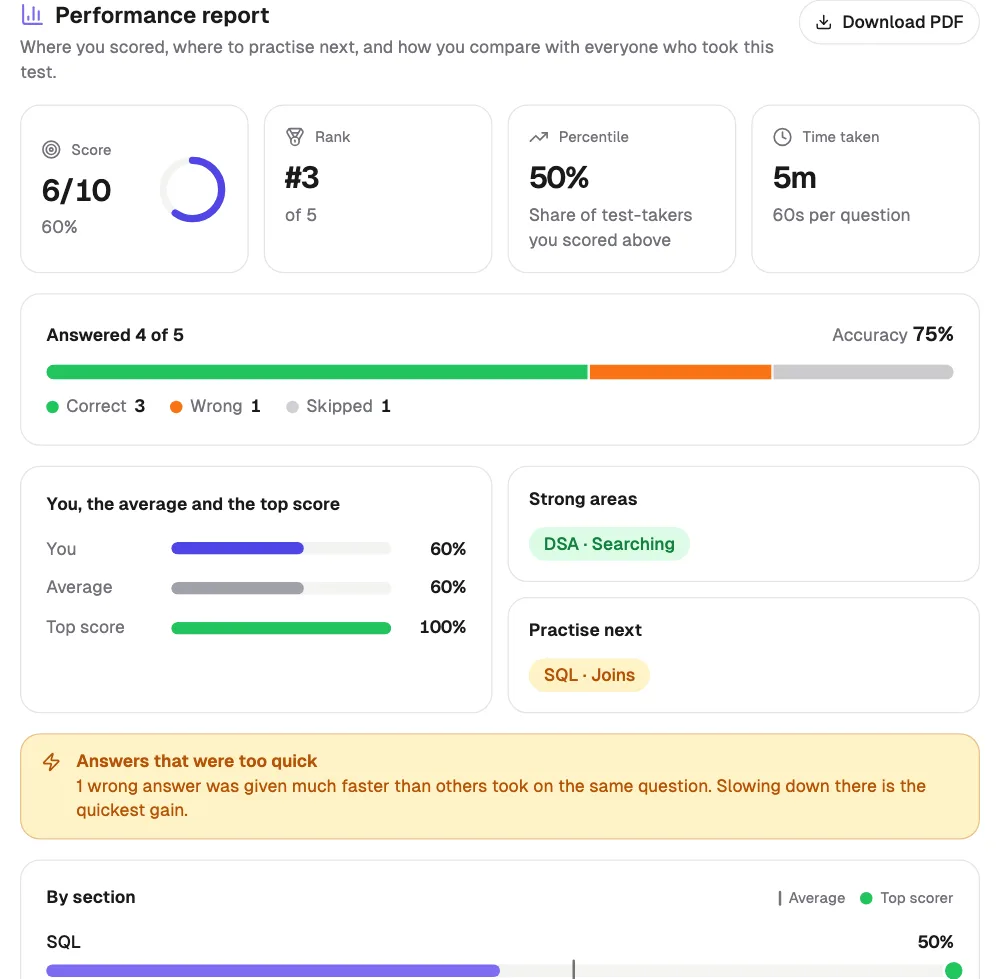
- Score, rank, percentile, accuracy, time, sections, topics, focus areas, PDF
- Teachers see
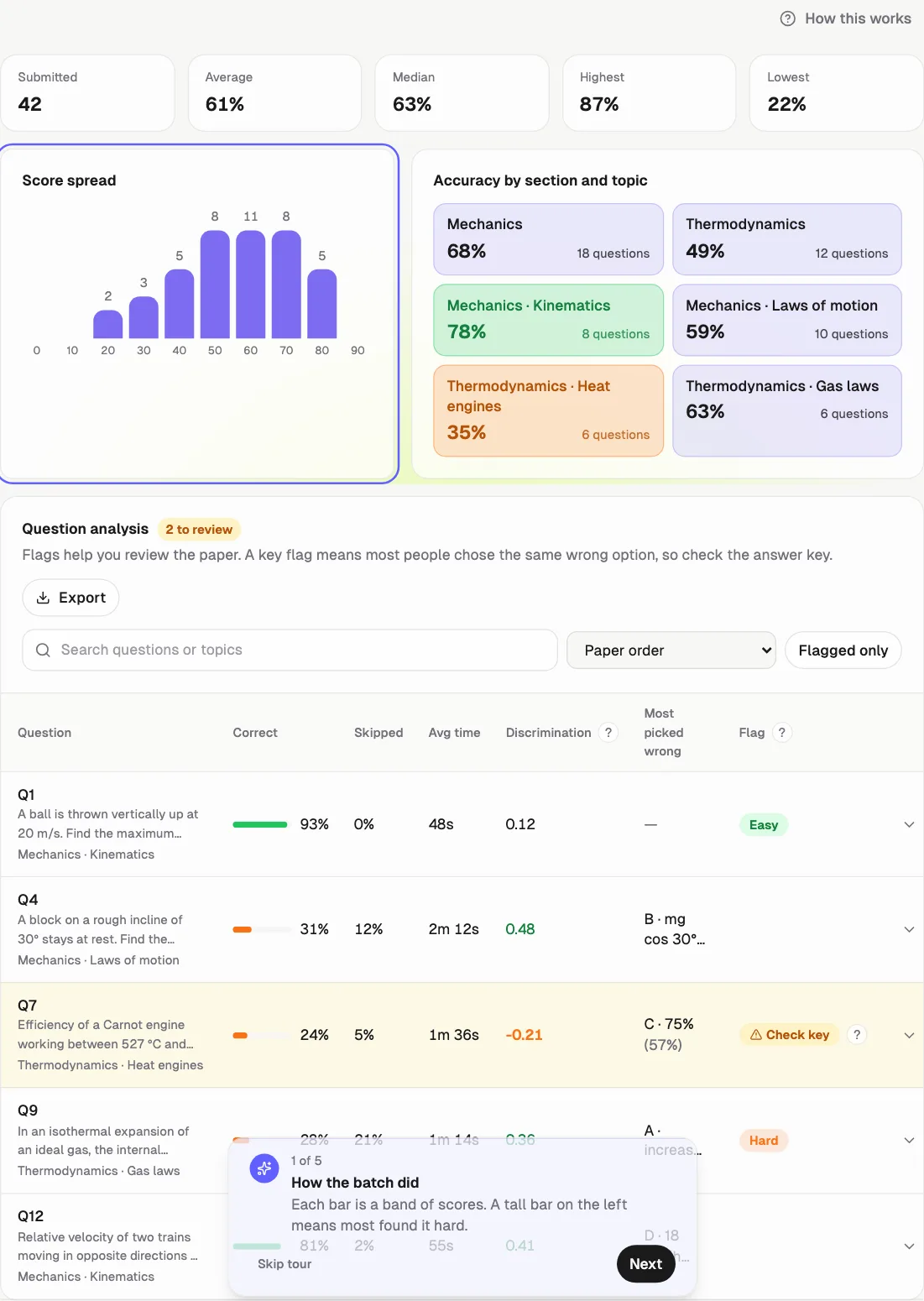
- Score spread, topic heatmap, question analysis, each student's report
- Uses AI?
- No. Built from server-side marks, so the numbers are exact
- Control
- On or off for each test; hidden when results are hidden
- Wrong answer key?
- Fix it after the test. Every paper is marked again; undo any time
- Made for
- JEE, NEET, UPSC, SSC, banking, school tests, SQL and DSA batches, hiring
What each student gets
Score, rank and percentile
Where they stand in the batch the moment they submit.
Accuracy and attempts
Correct, wrong and skipped, and accuracy on what they answered.
Sections and topics
Each one against the batch average and the topper.
Practise next
Their strong areas, and the topics to work on first.
Too-quick answers
Wrong answers given much faster than others took.
Progress and PDF
Results across tests, and a report to download.
What each teacher gets
Check-key flags
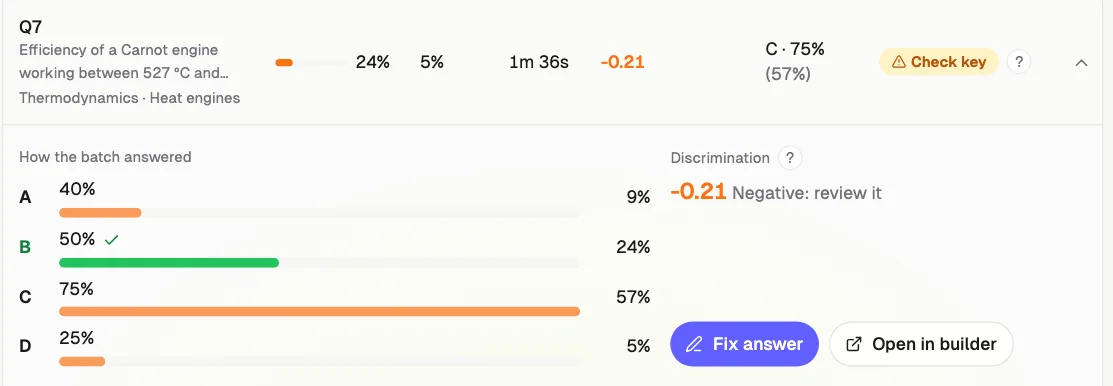
Questions where most students chose the same wrong option.
Hard and easy questions
Correct rate, skip rate and average time per question.
Score spread
How the batch is spread from lowest to highest.
Topic heatmap
Accuracy by section and topic across the class.
Every student's report
Open any student's report from the results table.
Every option's share
How many picked A, B, C and D on each question.
Discrimination
Whether strong students beat weak ones on a question. Low means review it.
Search, sort, export
Hardest or weakest questions first, and a spreadsheet of it all.
Fix a wrong answer key, after the test
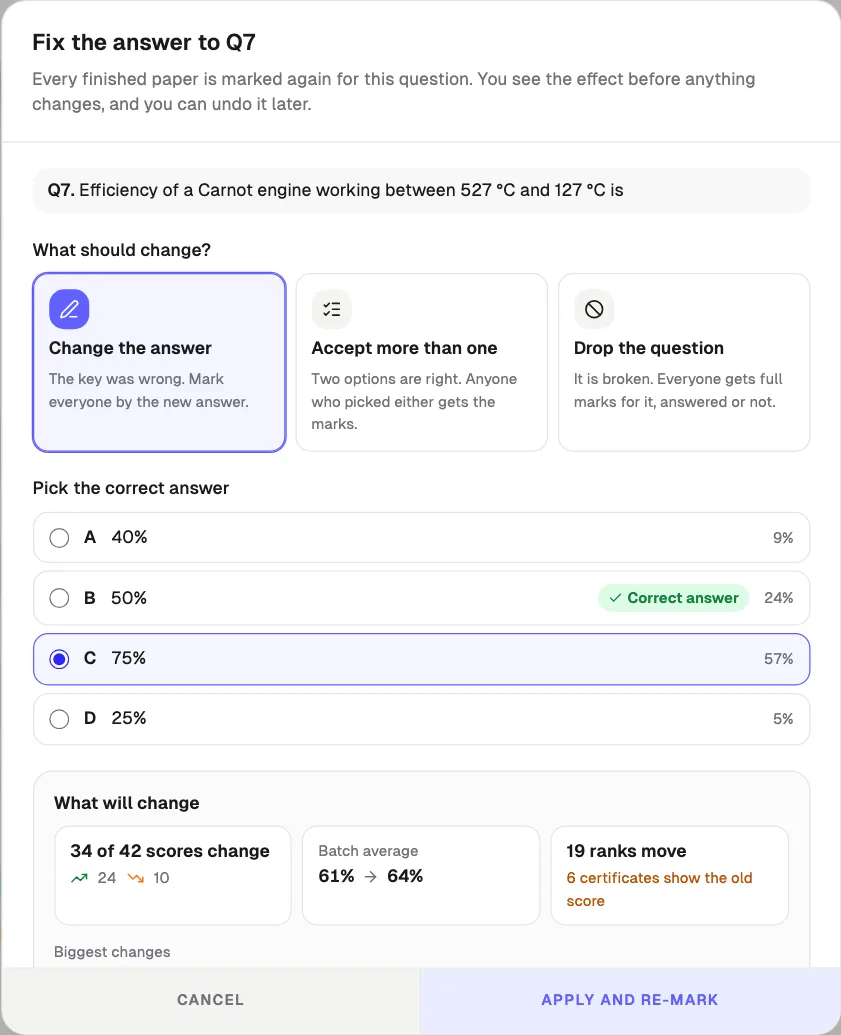
Found a wrong key once results are out? Open the question, pick what changes, and see the effect before anything moves: how many scores change, the new batch average, and ranks. Then every finished paper is marked again on the server.
Change the answer
The key was wrong. Everyone is marked by the new answer.
Accept more than one
Two options are right. Picking either gets the marks.
Drop the question
It is broken. Full marks to everyone who sat the test.
- Preview first: scores up and down, batch average, ranks
- Students whose score changed get an email with old and new score
- Certificates already sent are sent again with the new score
- Every change is kept; undo puts every score back
- Re-marking is free; emails and certificates use your email credits
- Owners and admins only
How to turn it on
Create a test
Add sections and tag questions with a topic, or let Smart Assist tag them.
Keep reports on
On the schedule step, Performance report is on by default.
Students submit
Each student sees their report on the result page.
Open Analytics
Results → Analytics shows the class and flags questions.
Fix a key if needed
Open a flagged question, tap Fix answer, check the effect, apply.
Questions about performance reports
What is in a Qwiktest student performance report?
Score, rank, percentile, accuracy, time taken, and correct, wrong and skipped counts. Then accuracy by section and topic, each compared with the batch average and the topper, the student's strong areas, the topics to practise next, wrong answers given too quickly, progress across tests, and a PDF download.
Does it work for coding, UPSC or school tests, not just JEE and NEET?
Yes. Sections and topics are whatever the teacher names them, so the same report works for JEE, NEET, UPSC, SSC, banking, school and college tests, SQL and DSA batches, aptitude and hiring tests.
What does the Check key flag mean?
Qwiktest flags a question when more students chose one wrong option than the correct one, and at least 35% chose it. That usually means the answer key is wrong or the question is unclear, so the teacher can review it before results go out.
Can I fix a wrong answer key after the test on Qwiktest?
Yes. In Results → Analytics, open the question and tap Fix answer. Change the answer, accept more than one option, or drop the question for full marks to everyone. You see how many scores change before applying, students can be emailed their new score, and every change can be undone.
What is discrimination in question analysis?
It compares how the top 27% and bottom 27% of the batch did on a question, from −1 to 1. Around 0.3 or more is good: strong students got it right more often. Low or negative means weak students did as well or better, so the key or wording needs a look.
Is AI used to make the report?
No. Every number comes from answers marked on the Qwiktest server. The report only counts and compares, so it is exact and the same for everyone. AI never marks students on Qwiktest.
Can a teacher turn performance reports off?
Yes. Each test has a Performance report switch on the schedule step. When it is off, or when results are hidden, students do not see a report. Teachers always see class analytics and every student's report.
Does it slow down the exam?
No. Reports are built only when someone opens them, on their own requests, after the test is submitted. Batch numbers are counted in the database and reused for a minute, so a large batch opening results together stays fast.
How much does it cost?
Performance reports are included on every Qwiktest plan, including the Free plan, at no extra cost.